Notificall
Notificall for Android
is now available for
the low price of 1.99!
click the button below to view Notificall on Google Play!
Or pick up the Developer version on my itch.io creator page Here.
Never miss a beat with NotifiCall! Say goodbye to delayed notifications for any app you've downloaded from Google Play, or web browser apps you've installed, such as X (formerly Twitter), LinkedIn, Fanvue, etc.. You can now get notifications as they happen, not when your Android communication device decides to allow them through! Notificall is perfect for creators and fans alike, or anyone who thrives on real-time feedback. So whether you’re chasing likes, messages, or being one of the first on the scene in the hottest new thread, or rushing in to collect that game drop, Notificall has you covered!
Notificall - Instant Notifications App
Why use Notificall?
• Creators: Stay connected with fans without delays!
• Fans: be amongst the first to reply to your favorite creator's posts or DMs!
• People who rely on instant relational feedback!
• Pixel and Samsung device users, plus other newer Android devices!
• To get notifications when an in-game task has completed or a treasure drop becomes available in your favorite video games!
• To receive instant notifications for apps installed from the google play store!
• To receive Instant notifications for browser installed Web Apps!
Notificall restores your device's core purpose: timely communication, to let people communicate in as timely a manner as possible. But lately it seems In the last few years battery charge up time has taken over the spotlight, the reason? For a company to boast their product has the longest battery up time to sell more devices!! The price you the consumer pays? When your phone's asleep and it's screen is off, your notifications get delayed! That is not acceptable! there is a scenario going on as of late you probably know all too well: You get a notification from one of your apps, you rush over and unlock your device because you know who it is, or that it's the drop you've been waiting for in your game that has just happened! you turn on the screen and see it is true! that notification came through!! But at last it was not to be! you open the notification and find out the drop you'd been waiting for in your game had come and gone 7 to 14 minutes ago, or the creator you follow had said they were giving something special to their followers responding in the next 90 seconds, and even though your screen was only off for a few minutes, the notification delay was a full 7 minutes late.. or more! That means opportunities lost forever. Well not any more! With Notificall at the helm, there will be no more of having to keep your device plugged in and charging with the 'Keep Screen On While Charging' setting enabled in the Developer Options so you can receive notifications in a timely manner, which quickly drains your battery and shortens it's life as well!
Why is this happening?
Android’s battery-saving features are slowing down your connections with a routine called 'Maintenance Windows'. When your screen shuts off and a few minutes go by, typically 15 to 30, and much less on some Samsung devices, your device goes into 'Doze Mode' in which only system apps with high priorities, such as your Phone app and factory installed text messaging app, are allowed to open a maintenance window and send you a notification, For all other apps there opens a Maintenance Window every 7 to 14 minutes, or even longer the deeper into doze mode the device gets as time goes by without turning the screen back on. If your device detects you yourself are sleeping, you won't get notifications for a half hour or even more!
App features:
• 2 ways to select your apps! Select any social media apps installed on your device from a list, or select any of your apps installed on your device from a list.
• Respects your selected app's individual notification settings.
• Dialog boxes guide you seamlessly through setting up your apps to receive your notifications fast.
Note that just setting the recommended settings for your apps is not enough, Notificall uses proprietary code along with these settings to monitor and retrieve your notifications when they arrive from the server when your device is sleeping!
• easy to understand no-nonsense User Interface.
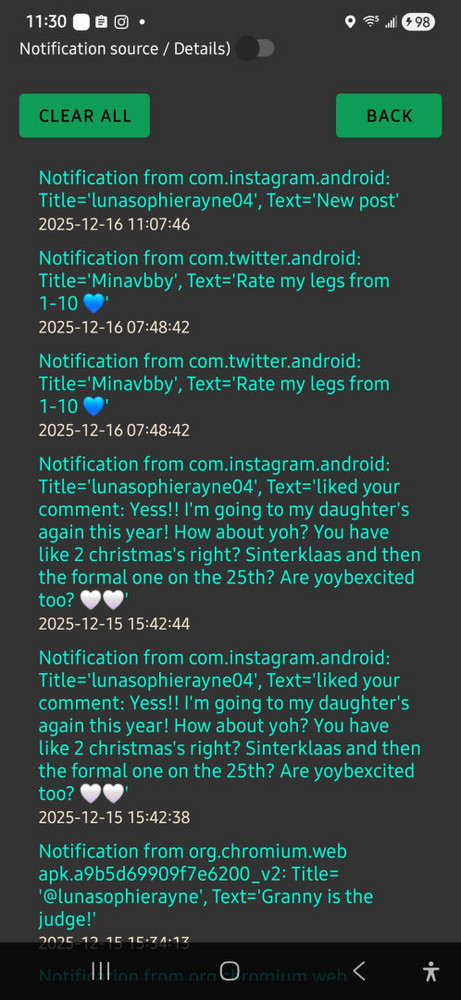
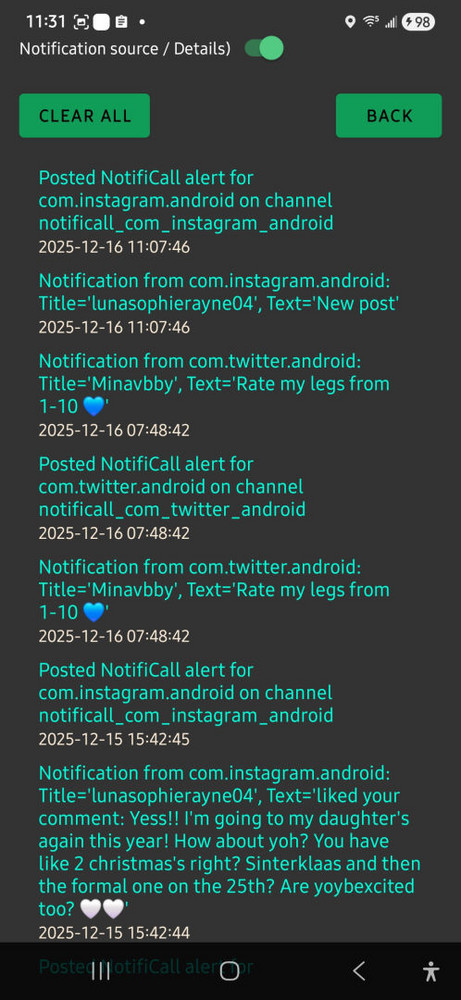
• All of your message notifications are saved in descending order on the APP INFO page so you can find any received notifications at any time.
• Notificall can be shutdown for times you don't want to receive instant notifications.
• Minimal battery drain when in use, in my testing on a Samsung a54g, I got 18 - 20 hours on a full charge. In fact, Notificall uses a negligeable amount of battery charge, if you go into your device's battery usage in settings and click details, you might not even see it on the list because it uses less than 0.1%.
• No need to root your device to use any of Notificall's features.
• Refresh button: If you stop getting timely notifications for the aps you've selected the most likely cause is if you or the operating system revoked a needed permission, This can sometimes happen during an operating system update. The 'Refresh' button checks the permissions and if needed will ask to re- enable them.
Notificall's Privacy policy can be viewed here:
Privacy Policy
Usage instructions:
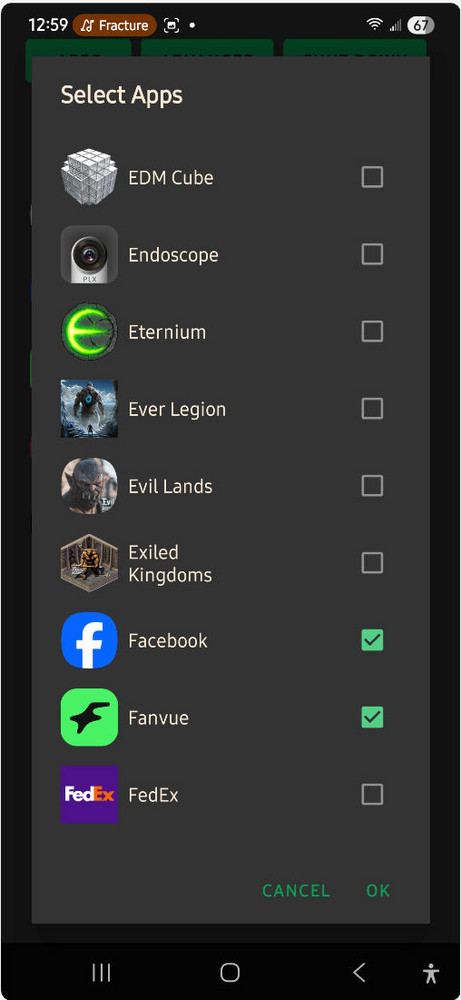
Open the app and accept all the permissions or the app will not work. Click the ALL APPS option, and then click the APPS button. select any app(s) you want to receive instant notifications from when your Android device is sleeping by clicking the checkbox next to the app's name in the list. For proper testing of Notificall, make sure to select at least one app you installed from a web browser, (these types of apps are known as Web APKs) such as X (formerly Twitter), Linked in, Fanvue, etc.. along with at least 1 app you downloaded from google play. When selecting the apps, you might get a prompt to adjust that app's settings, click the apply option or the option to go to the app's settings and adjust as instructed. Note that just adjusting these settings without Notificall will not fix your problem of not getting timely notifications when your device is sleeping, but those settings are necessary for Notificall's proprietary code to make it work for you. That's it, you're done and can close the app via your device's back button.
Buttons:
APPS - Takes you to a list of your installed apps.
REFRESH - Re runs Notificall's setup permissions in the event something went wrong, such as permissions reset from an OS system update, or the user revoked a permission, don't forget, all the permissions need to be accepted or Notificall cannot do it's job.
SHUT DOWN - Press this at times you don't want instant notifications from your selected app list in Notificall, re open the app to continue monitoring for notifications again. When Notificall is shut down it won't save notification messages or details in the MESSAGES page of the app, won't sent notifications to your device, and won't use any battery power in the background.
SOCIAL APPS - This option sets the APPS button's display list to include only social media type apps.
ALL APPS - This option sets the APPS button's display list to include all apps except system apps. (System apps such as phone, messaging etc.. are installed in their own special inaccessible folder and are exempt from device sleep notification delays anyway.)
MESSAGING - Here you can see all the messages and details of the notifications you've received from the apps you have chosen in Notificall. On this page you can toggle on or off the details of your notifications. The CLEAR ALL button will delete all saved messages and their details, and the BACK button returns you to Notificall's main page.
App Behavior:
When you get a notification from an app in your list, and your device's screen is off and / or the device is asleep, the notification sound and vibration you have set in your chosen app's settings will play. In the case of Web APKs the notification sound will play for 1/2 a second and stop, then immediately play the notification sound in full, discerning a notification from a web installed app vs. one installed from google play.
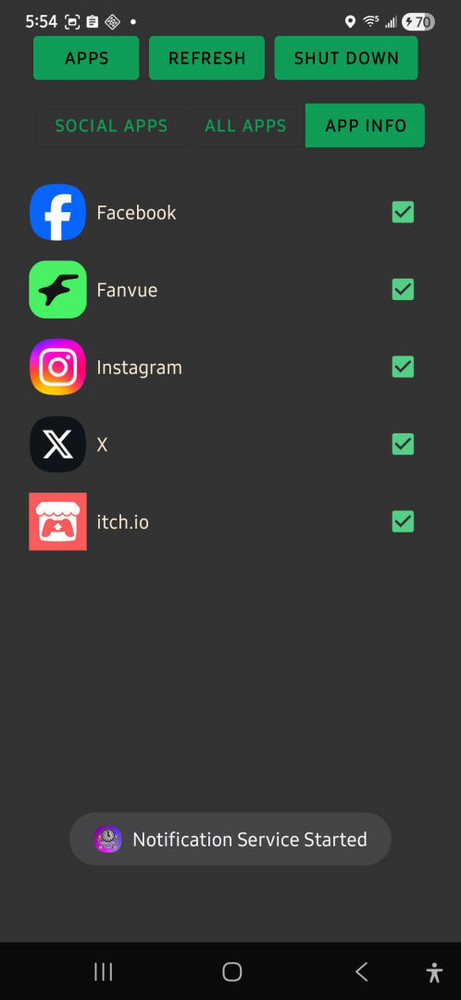
When opening the app you will get a toast (pop up message) confirming the app is in working order and an image of a clipboard will be displayed in the system tray at the top of your device's screen.
Apps you have added via the APPS button will be displayed on Notificall's main page with checked check boxes next to each one. Unchecking the box will remove the app from the monitored apps list. Also, on the APPS page where you select the apps, you can uncheck any checked boxes to remove that app from the monitored apps list as well.
When Notificall is shut down, it won't save notification messages or details in the MESSAGES page of the app, won't send it's own notification to your device, and won't use any battery power in the background.
When Notificall is active, it should use very minimal battery power, in my testing it was under 1% as compared to all other apps on my device, and I have a LOT of apps on my device.
Left click to spin the carousel, right click (long press on mobile) to view the full image